


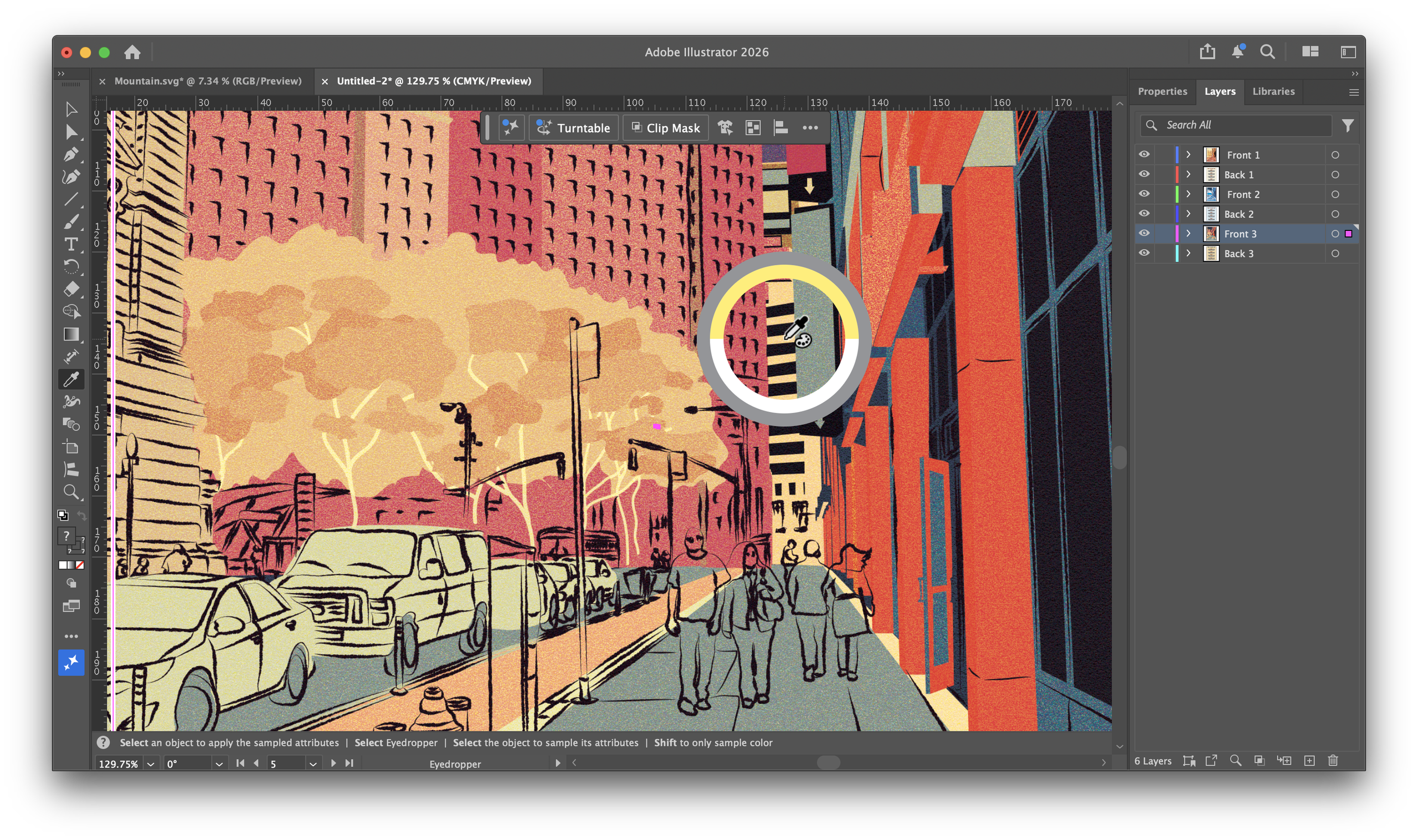
Introduction to Adobe Illustrator 2026
As the design community anticipates each annual release of Adobe Illustrator, the 2026 update arrives with a mix of excitement and skepticism. Adobe has long been a cornerstone in the graphic design industry, but with increasing competition from various software alternatives, the pressure is on to enhance the user experience and address persistent issues. This review delves into the new features, improvements, and overall impact of Adobe Illustrator 2026 on professionals and businesses alike.
Enhanced User Interface for Streamlined Workflow
One of the most noticeable changes in Adobe Illustrator 2026 is its revamped user interface. Adobe has introduced a more intuitive layout designed to enhance workflow efficiency. The streamlined menu options and customizable workspace allow users to tailor their environment to fit their specific needs, reducing the learning curve for new users while providing seasoned designers with the flexibility they crave. The updated interface is not just a cosmetic change; it reflects Adobe's commitment to making design processes more efficient and user-friendly.
New Tools and Features: A Closer Look
Among the standout features in the 2026 update is the introduction of advanced vector editing tools. These tools aim to simplify complex design tasks, enabling users to manipulate shapes and paths with greater precision. The enhanced gradient and color blending options have also garnered attention, allowing for more sophisticated color transitions and effects. These improvements are particularly beneficial for graphic designers focused on branding and marketing materials, where color accuracy and vibrancy are paramount.
Moreover, Illustrator 2026 has integrated artificial intelligence capabilities that promise to revolutionize design processes. The AI-powered suggestions can analyze user behavior and recommend design elements or adjustments, potentially reducing the time spent on revisions. This feature positions Adobe Illustrator as not just a tool for creating designs, but also as a partner in the creative process.
Addressing Long-Standing Glitches
For many users, the annual update often brings hope for the resolution of persistent glitches that have plagued previous versions. Adobe Illustrator 2026 seems to have made strides in this area, particularly concerning performance stability. Users report fewer crashes and smoother operation when handling large files, which has historically been a pain point for graphic designers. Additionally, the update has focused on improving compatibility with other Adobe products, ensuring a seamless experience across the Adobe Creative Cloud ecosystem.
Impact on Collaboration and Remote Work
As remote work continues to be a standard practice for many businesses, Adobe Illustrator 2026 has introduced features aimed at enhancing collaboration among teams. The new cloud collaboration tools allow multiple users to work on a document simultaneously, making it easier for teams to share ideas and provide feedback in real-time. This functionality is particularly beneficial for design teams spread across different locations, as it fosters a more integrated approach to creative projects.
Furthermore, the update has improved integration with Adobe's cloud services, allowing for easier access to assets and templates. This not only saves time but also encourages consistency in branding and design across various projects. As businesses increasingly rely on digital collaboration tools, these enhancements position Adobe Illustrator as a leading choice for teams looking to streamline their design processes.
Market Position and Competitive Landscape
The graphic design software market is highly competitive, with numerous players vying for a share of the increasingly digital landscape. Adobe Illustrator remains a dominant force, but it is crucial for the company to stay ahead of emerging competitors. The features introduced in the 2026 update reflect a strategic response to these challenges, aiming to retain existing users while attracting new ones. With the rise of affordable and user-friendly design tools, Adobe must continue to innovate and demonstrate the value of its offerings.
Adobe's focus on integrating AI and enhancing collaboration tools speaks to a broader trend within the industry. As businesses seek to maximize productivity and reduce costs, the demand for innovative software solutions that facilitate remote work and improve workflow efficiency is on the rise. Illustrator 2026's response to these market demands could solidify its position as the go-to choice for professional designers.
User Feedback and Community Reception
Initial user feedback on Adobe Illustrator 2026 has been largely positive, with many praising the improvements in user experience and tool functionality. Designers have expressed appreciation for the new vector editing capabilities and the enhanced integration of AI features. However, as with any software update, there are mixed opinions regarding the learning curve associated with some of the new tools. While some users embrace the changes, others may require time to adapt to the updated features.
The design community's reception of the update will play a critical role in shaping Adobe's future updates. As users share their experiences and suggestions, Adobe can refine its offerings to better meet the needs of its customers. This ongoing dialogue between the company and its user base is essential for maintaining loyalty and ensuring the software remains relevant in a rapidly changing industry.
Conclusion: Is Adobe Illustrator 2026 Worth It?
As businesses and professionals assess the value of Adobe Illustrator 2026, the updates and enhancements present a compelling case for adoption. The improved user interface, advanced tools, and collaboration features cater to the evolving needs of designers in a digital-first world. While some long-standing glitches have been addressed, ongoing user feedback will be crucial in determining the software's long-term viability.
Ultimately, Adobe Illustrator 2026 positions itself as a powerful tool for graphic designers, offering a blend of innovation and reliability. For businesses looking to enhance their design capabilities, this update may very well be worth the investment, provided that users are prepared to embrace the changes and adapt their workflows accordingly. As design continues to play a pivotal role in business success, tools like Adobe Illustrator will remain integral to achieving creative excellence.